Friday, 11 January 2019

What are the different Types of Cisco SFP Modules for 10Gbps Speed?

Cisco 10GBASE-T SFP

--> Uses a copper cable to connect between two devices.

--> Supports distance up to 100 meters.

--> Maximum data rate supported up to 10 Gbps.

--> Uses CAT 6A Cable.


Cisco 10GBASE-CX SFP

--> Uses a Infinity Band cable to connect between two devices.

--> It is a cost-effective connection within racks and across adjacent racks.

--> Maximum data rate supported up to 10 Gbps.

--> This cable is suitable for distances up to 15 meters.


Cisco 10GBase-ZR 

--> Uses Single Mode fiber to connect between two devices.

--> Supports distance up to 80 Kilometers.

--> Maximum data rate supported up to 10 Gbps.

--> Uses Dual LC link.


Cisco 10GBASE-ER

--> Uses Single Mode fiber to connect between two devices.

--> Supports distance up to 40 Kilometers.

--> Maximum data rate supported up to 10 Gbps.

--> Uses Dual LC link.


Cisco 10GBASE-LR

--> Uses Single Mode fiber to connect between two devices.

--> Supports distance up to 10 Kilometers.

--> Maximum data rate supported up to 10 Gbps.

--> Uses Dual LC link.


Cisco 10GBASE-LX4

--> Uses Multi Mode fiber to connect between two devices.

--> Supports distance up to 10 Kilometers.

--> Maximum data rate supported up to 10 Gbps.

--> Uses Dual LC link.


Cisco 10GBASE-LRM

--> Uses both Single and Multi-Mode fiber to connect between two devices.

--> Supports distance up to 300 meters.

--> Maximum data rate supported up to 10 Gbps.

--> Uses Dual LC link.

Cisco 10GBASE-SR

--> Uses Multi-Mode fiber to connect between two devices.

--> Supports distance up to 400 meters.

--> Maximum data rate supported up to 10 Gbps.

--> Uses Dual LC link.
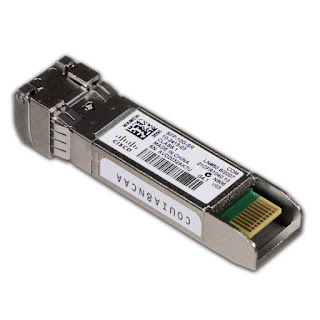


Ref: Cisco.com

Md.Kareemoddin

CCIE # 54759

What are the different Types of Cisco SFP Modules for 1000 Mbps Speed?

Cisco 1000BASE-T SFP

--> Uses a copper cable to connect between two devices.

--> Supports distance up to 100 meters.

--> Maximum data rate supported up to 1000 Mbps.

--> Uses CAT 5 Cable.


Cisco 1000BASE-TX SFP

--> Uses a copper cable to connect between two devices.

--> Supports distance up to 100 meters.

--> Maximum data rate supported up to 1000 Mbps.

--> Uses CAT 6 Cable.


Cisco 1000BASE-CX SFP

--> Uses a Twinax cable to connect between two devices.

--> It is a cost-effective connection within racks and across adjacent racks.

--> Twinax cable is suitable for distances up to 5 meters.

Cisco 1000 Base-ZX GBIC

--> Uses Single Mode fiber to connect between two devices.

--> Supports distance up to 70 Kilometers.

--> Maximum data rate supported up to 1000 Mbps.

--> Uses Dual LC link.

Cisco 1000BASE-BX10 GBIC

--> Uses Single Mode fiber to connect between two devices.

--> Supports distance up to 10 Kilometers.

--> Maximum data rate supported up to 1000 Mbps.

--> Uses Single LC link.

Cisco 1000BASE-LX10

--> Uses Single Mode fiber to connect between two devices.

--> Supports distance up to 10 Kilometers.

--> Maximum data rate supported up to 1000 Mbps.

--> Uses Dual LC link.

Cisco 1000BASE-LX

--> Uses Multi-Mode fiber to connect between two devices.

--> Supports distance up to 550 meters.

--> Maximum data rate supported up to 1000 Mbps.

--> Uses Dual LC link.


Cisco 1000BASE-SX

--> Uses Multi-Mode fiber to connect between two devices.

--> Supports distance up to 500 meters.

--> Maximum data rate supported up to 1000 Mbps.

--> Uses Dual LC link.

Ref: Cisco.com

Md.Kareemoddin

CCIE # 54759


Saturday, 29 December 2018

Introduction to vCMP in F5

--> vCMP stands for Virtualized Clustered Multiprocessing.

--> vCMP is a hypervisor in F5 which allows you to divide one physical high powerful F5 device into multiple independent virtual F5 devices.

--> vCMP allocates CPU, memory, and storage for every logical or virtual BIG IP device.

--> We can create a number of instances of BIG IP system depend upon the configuration of the F5 hardware chasis.

--> vCMP uses built-in flexible resource allocation feature.

--> By using flexible resource allocation, We can allocate the separate size of resources to every BIG IP virtual instance according to the requirement.


--> vCMP provides the resources to every virtual instance in the form of cores to it.

--> Each core contains a portion of CPU and memory assigned to it.

--> vCMP is not supported in all of the BIG IP devices.

--> vCMP is supported in some of VIPRION chassis and BIG IP Devices such as,

i) VIPRION B2100, B4200, B4300, B4340N

ii) BIG IP 5200v, 7200v,10200v


--> With vCMP we have the following components,

i) vCMP host

--> This is the hypervisor which allows you to create and configure BIG IP Instances.

--> This Instances are known as vCMP guests.

--> For every guest, vCMP host allocates CPU and memory to it.

ii) vCMP Guest

--> vCMP Guest is the BIG IP instance which is created on vCMP host.

--> Each and every vCMP Guest is allocated BIG IP Modules such as LTM, GTM, ASM and APM to process the traffic.

--> Every Guest contains its own self IP Address, Management IP Address, and list of Virtual Servers.

--> Every Guest act as separate BIG IP device without having the knowledge of other BIG IP instances are present on vCMP host.

--> Each Guest can be divided by using Route domains and Partitions.

--> Each Guest can have different BIG IP version and different modules compared to other Guests in vCMP host.

iii) Virtual Disk

--> Virtual Disk is the storage area for the vCMP guest on the vCMP host.

--> Each Virtual Disk is configured as an image file with .img extension.

--> If vCMP Guest is allocated in two slots of vCMP host then the system creates and assigns two virtual disks to the guest.

iv) Cores

--> A Core is the Portion of CPU and system memory allocated to a guest.

--> The Amount of CPU and System memory that core contains depends upon the hardware platform.

--> CPU's in the core remain idle if the Core is not assigned to any host.

Note: There are two types of Administrators would come into picture when we use vCMP.

i) vCMP host Admin: 

--> used for creating guests and assigning the resources to the guests.

ii) vCMP guest Admin:

--> used for assigning and provisioning the BIG IP modules within the guest.

Ref: F5.com

Md.Kareemoddin,

CCIE# 54759


Saturday, 24 November 2018

What is SSL Bridging in F5 LTM?

SSL Bridging

--> Client SSL Profile only encrypts the traffic between Client and F5 LTM.

--> It does not encrypt the traffic between F5 LTM and Real Server.

--> But if there is a requirement that the traffic between LTM and the real server also need to be encrypted then in that case we use SSL Bridging.

--> SSL Bridging or SSL Termination allows the traffic between LTM and Real Server to be encrypted before sending.

--> In order to enable SSL Bridging, we need to create SSL Server Profile and assign it to the Virtual Server in addition to Client SSL Profile.


--> Once you apply Client SSL and Server SSL Profile to the Virtual Server, F5 LTM Creates two encrypted sessions:

i) Encrypted Session between Client and F5 LTM. ( Client SSL Profile)

ii) Encrypted Session between F5 LTM and Real Servers ( Server SSL Profile)

--> We can use different Certificates for different Sessions in F5 LTM.

--> For example, We can use SSL Certificate with higher key length on Client SSL Profile and SSL Certificate with lower key length on Server SSL Profile.

--> SSL Bridging Concept needs to be applied on Correct Pool on F5 LTM. ( Only For pool with HTTPS traffic)

Ref: F5.com

Md.Kareemoddin

CCIE # 54759

Tuesday, 20 November 2018

Types of Monitors used in F5 LTM?

Simple Monitoring

--> A Simple Monitoring just checks whether a host is reachable or offline.

--> No Intelligence present.

--> Following are the monitors used in simple monitoring,

1) Gateway ICMP

2) ICMP

3) TCP_ECHO

Active Monitoring

--> In Active Monitoring, BIG IP sends some type of application traffic and waits for a response from the node or pool member.

--> Uses Intelligence.

--> This can be done by using send and receive string configured under the monitor.

--> F5 LTM makes node or pool member offline, if it does not receive the response or if the response is not matching the specific receive string.

--> HTTP and FTP are the monitors used in Active Monitoring.

--> Active Monitoring creates additional traffic and uses additional resources on F5 LTM.


Passive Monitoring

--> In Passive Monitoring, BIG IP does not sends any type of application traffic to know node or pool member is offline or not.

--> Passive Monitoring is also known as Inband Monitoring.

--> In Passive Monitoring, BIG IP LTM monitors the traffic is going to/from pool member.

--> If the pool member does not respond to new connections or existing connections properly then f5 ltm makes pool member as offline.

--> The main advantage of Passive Monitoring is,it does not create any additional traffic to find out the pool member is offline or online.

--> Does not consume more resources on F5 LTM.

--> Passive Monitoring does not check for specific resources which makes f5 ltm slow to identify pool member or node is offline.

--> Inband monitor is the only monitor used in Passive Monitoring.

--> Passive Monitor works depends on the client traffic from F5 LTM to Pool Member.


Ref: F5.com

MD.Kareemoddin

CCIE # 54759

Thursday, 25 October 2018

Introduction to Cisco ASA Modules

--> Cisco ASA 5500 Series Firewalls allow you to insert hardware modules for increased security and more features.

--> There are basically three different types of hardware modules we can use on ASA 5500 series:

1) ASA CX Module ( For USer Identification)

2) ASA IPS Module ( For IPS Functionality)

3) ASA SFR Module ( For Implementing Firepower Services on ASA).


--> Previously in Cisco ASA, we used to insert hardware modules that contain a software with IPS or CX Feature. 

--> Currently in Cisco ASA, we are using an SSD disk drive instead of a hardware module and the software functionality such as IPS or CX is installed in the SSD Disk Drive.

--> Working of the module in the Cisco ASA is same if it is applied as hardware or software.

--> Cisco ASA Firewall receives the traffic on the physical interface and forwards it to the hardware or software module.

--> Once Module receives the traffic from ASA, it is going to inspect it based upon the policy configured.


-->  If Policy configured is on the module marks the traffic as good then module returns the traffic to the ASA and the traffic is forwarded to the destination.

--> If Policy configured is on the module marks the traffic as not good then the module tells ASA to drop the traffic.

--> # show module command allows you to check which modules are installed and running on the ASA.

--> Currently it is not possible to run more than one module on the ASA.

--> If you want to remove any module on ASA then execute the following commands,

asa# sw-module module cxsc shutdown

asa# sw-module module cxsc uninstall

asa# reload

Note: If you want to remove IPS Module then replace cxsc with ips in the command.

Ref: Cisco.com

Md.Kareemoddin

CCIE # 54759

Friday, 19 October 2018

What is the difference between positive and negative security model?

--> Selecting the security model depends upon the type of the network and content you are going to secure.

--> There are basically two security models are used in the network.

1) Positive Security Model

--> A Positive Security model is also known as whitelist model.

--> A Positive Security model works by denying everything and allow only the things which are required in the network.

--> All the firewalls in the network works on this model.

--> The main advantage of implementing a positive security model in the network is that zero-day attacks can be prevented.

--> Positive Security Model leads to more false positives, as it blocks everything related to an application until you specify it.

--> If an application changes or modifies its behavior we need to create a new policy in order the application to work.

--> Positive Security model is recommended for securing web applications.


2) Negative Security Model

--> A Negative Security model is also known as Blacklist model.

--> A Negative Security model works by allowing everything and denies only the things which are required in the network.

--> Anti-Virus and IPS/IDS in the network works on this model.

--> The main advantage of implementing negative security model in the network is it can be deployed rapidly.

--> Negative Security Model does not lead to more false positives, as it allows everything related to an application and denies the things which are specified manually.

--> Negative Security Model cannot prevent zero-day attacks because of its behavior.

--> Negative security model is recommended for anti-spam and antivirus.


--> In order to find which model is suited for your organization there are a number of factors we need to consider,

i) Number of objects

ii) Number of content types

iii) Content Changes

--> For example, if a website is having fewer objects ( ex:50 objects) and having only pictures and texts then it is recommended to use the positive security model.

--> For example, if a website is having more objects ( ex:500 objects) and content changes every day then it is recommended to use the negative security model.


Ref: F5.com

Md.Kareemoddin

CCIE # 54759

Like Our Page On Facebook  https://www.facebook.com/networkingforu/